Memory Scanner
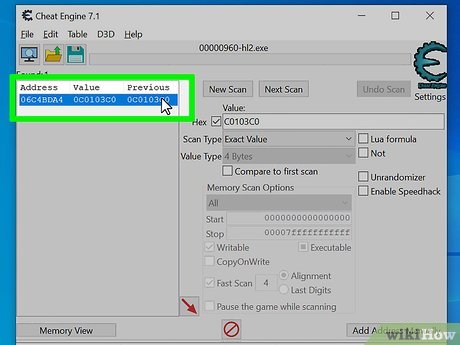
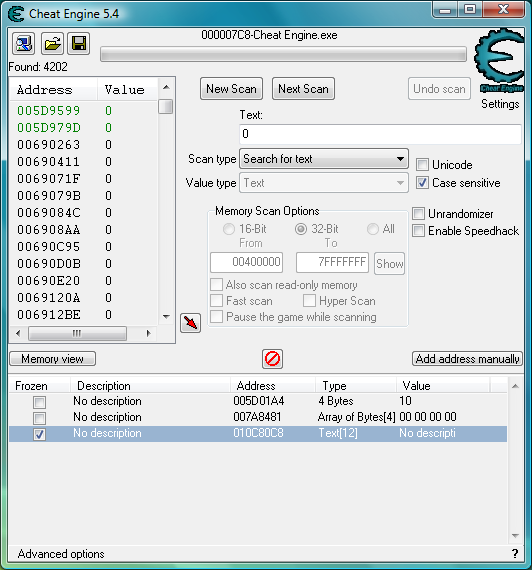
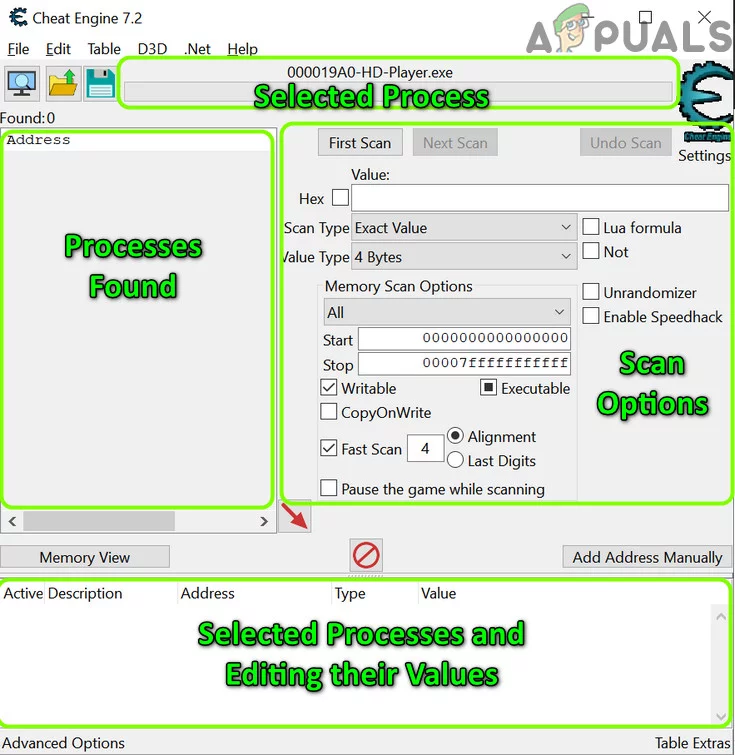
Quickly scan for variables in any process. Find health, money, ammo, and more. Filter by value type and narrow results with next scan.
The ultimate memory scanner and game modification tool. Modify single-player games, debug applications, and learn reverse engineering — for free.
Everything you need
Download Cheat Engine for free, run the built-in tutorial, and explore our guides and wiki for more advanced techniques. If you run into problems, check the FAQ and Guides for solutions from the community.
Download Cheat EngineCheat Engine is not just for "cheating" in games. It is a powerful, free tool used by thousands of players, modders, and developers for single-player fun, learning reverse engineering, and debugging applications. Here is why it has stayed popular for years.
In offline games, you own the experience. Want more health, infinite ammo, or to slow down time during a tough boss? Cheat Engine lets you change values in memory so you can tailor difficulty to your taste. No server checks, no bans — just you and the game.
Many users also use it to fix broken or grindy single-player games: adjust drop rates, skip tedious sections, or give themselves resources after a crash so they do not lose progress.
Cheat Engine is widely used in education and by hobbyists to understand memory layout, pointers, assembly, and debugging. The built-in tutorial and wiki teach concepts that apply to game development, security research, and low-level programming.
You can attach to any process (with appropriate permissions), inspect memory, set breakpoints, and see how values change. It is a hands-on way to learn reverse engineering without needing expensive tools.
Cheat Engine is free. The source code is available so you can see exactly what it does and even compile your own build. Many extensions and Lua scripts are shared by the community. You never have to pay to use the core tool.
From simple value changes to advanced code injection and scripting — here are the main capabilities built into Cheat Engine.
Quickly scan for variables in any process. Find health, money, ammo, and more. Filter by value type and narrow results with next scan.
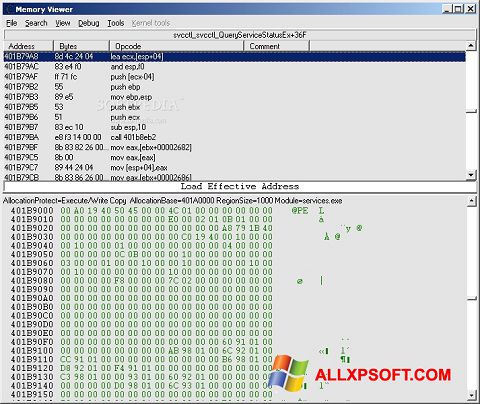
Full debugger with breakpoints, step execution, and disassembler. Inspect and modify code. Essential for advanced modifications and learning.
Change game speed without affecting your system. Slow down for precision or speed up grinding. Works with many single-player games.
Create standalone trainers from your cheat tables. Share with others or use hotkeys without keeping Cheat Engine open.
Extensive Lua support. Write scripts to automate scans, create GUIs, and build custom tools. Huge library of extensions shared by the community.
Find pointers that survive game restarts. Use AOB (Array of Bytes) for stable code injection across game updates.
Beyond these, Cheat Engine supports Mono and .NET inspection, structure dissect, auto-assembler scripts, and more. Check the About page for the full list.
New to Cheat Engine? Follow this short path to go from zero to your first successful value change.
Get Cheat Engine from the downloads page. If your antivirus blocks it, add an exception. Install with default options unless you know what you are changing.
From the Start Menu, open "Cheat Engine Tutorial." Complete at least Steps 1–5. You will learn how to attach to a process, choose a value type, do a first scan, next scan, and change a value. This takes about 15–30 minutes and saves hours of confusion later.
Choose an offline game with obvious values: health, gold, ammo, or score. Start the game, then in Cheat Engine click "Open Process" and select the game. Use the same steps as the tutorial: scan for the value, change it in-game, next scan, lock or change the address.
If the address of your value changes every time you restart the game, you need a pointer. Use "Pointer scan" after finding the value once, then filter after restart. The Tutorials and wiki have full guides on pointer scanning.
Small habits that make a big difference when you are starting out with Cheat Engine.
Health and ammo are often 4 bytes or 2 bytes. Percentages and coordinates are often Float or Double. If you get no results or too many, try another type. The tutorial shows how each type behaves.
After your first scan, change the value in the game (e.g. take damage, spend gold), then click "Next Scan." Repeating this narrows the list until you have one or a few addresses left.
As soon as you find something useful, save as .CT. Addresses can change when you restart the game; for stable cheats you will need pointers, but saving early avoids losing work.
Locking a value keeps it from changing. Useful for infinite health or ammo. Some games check for impossible values and may crash or reset — experiment in a save you can afford to lose.
Attach to one process only. If you switch games, close the current table or open a new Cheat Engine instance. Scanning the wrong process gives useless or confusing results.
Many games have protection or store values in non-obvious ways. The wiki and forum often have notes like "use Float" or "pointer required." A quick search saves time.
People use Cheat Engine for many different goals. Here are the most common scenarios and how the tool fits in.
Real experiences from the Cheat Engine community: common problems solved and tips that work. These topics come up again and again on the forum and in the FAQ.
Cheat Engine can manipulate any process and run scripts from cheat tables, so some antivirus software marks it as a hacktool. As long as you download from a trusted source and only use .CT files from trusted sources (you can open .CT files in a text editor — they're XML), you're fine. Many users add an exception or temporarily disable AV during install. See the FAQ for more.
— Common question, answered in FAQIf Cheat Engine won't install or run, check the Guides and FAQ for step-by-step solutions. Common fixes include running as administrator, excluding the folder from antivirus, and ensuring Visual C++ runtimes are installed.
— From supportWhat you changed was only the value displayed on your screen. The server stores the real balance. Cheat Engine is not designed for online games and won't bypass server-side checks. Use Cheat Engine only for single-player or local games where the data is on your machine.
— FAQ, repeated often on the forumNew users are recommended to complete the tutorial that comes with Cheat Engine (find it in the Start Menu after installing). Reaching at least Step 5 gives you a solid base: attaching to a process, first scan, next scan, and changing values. From there, try the wiki and video tutorials for pointers, AOB, and Lua.
— From About Cheat EngineIf you get thousands of addresses, narrow down with "Next Scan" after changing the value in the game (e.g. lose some health, then scan again). Use the correct value type (4 bytes, float, double, etc.) — wrong type gives useless results. If you get zero results, the value might be stored differently (encrypted, in a structure, or on the server). Try the tutorial first to see how a simple value behaves, then check the Guides for troubleshooting.
— Common on forum and in GuidesCheat Engine is powerful, but it has limits and legal boundaries. Use it responsibly.
A short glossary of terms you will see in Cheat Engine and in tutorials.
Cheat Engine 7.6 runs on modern Windows (10, 11). You need administrator rights to attach to some processes. For older games or compatibility issues, some users run older CE versions or use compatibility mode. Visual C++ runtimes may be required; see our Guides for details.
Antivirus may block the installer or the program; add an exclusion for the Cheat Engine folder.
A Mac version (e.g. 7.5.2) is available; see the Downloads page. It may lag behind the Windows release. Linux users can run Cheat Engine via Wine/Proton; there is a Cheat Engine Proton Launcher and community guides. CEServer is available for other platforms (e.g. Android, ARM) for network scanning — see the Downloads page.
Use Cheat Engine only on software you are allowed to modify under its license or terms of service.
Everything you need to download Cheat Engine, learn how to use it, and get help from the community.
Cheat Engine is a free tool for modifying single-player games and debugging applications. It is not for use with online games. It includes a memory scanner, debugger, disassembler, assembler, speedhack, trainer maker, Direct3D tools, system inspection tools, and extensive Lua scripting. Developers can build their own tools and share them. The source code is available for transparency and education; you may compile your own version for private use but may not publish derivative versions. New users should complete the built-in tutorial (at least through step 5) for a basic understanding.
The project is maintained by the original author and the community. Translations, add-ons, and CEServer builds are listed on our Downloads page. For advanced features such as DBVM (kernel-level debugging), see the DBVM page. For installation problems, antivirus issues, or "won't start" errors, check the FAQ and Guides.
For more detail, see our About and FAQ pages. Download the latest version from our Downloads page. Cheat Engine 7.6 is the current public release for Windows; Mac version is also available.
The Cheat Engine logo and icon. The tool has been in development for many years and is used worldwide for game modification, debugging, and learning.
Short answers to questions new users ask most. For more, see the full FAQ.
No. It is a legitimate tool. Antivirus may flag it because it can modify other processes. Download from our Downloads page and add an exception if needed.
No. Online games store important data on the server. Cheat Engine cannot change that and using it can get you banned.
Change the value in the game (e.g. lose health), then click Next Scan. Repeat until the list is small. Use the correct value type (4 bytes, float, etc.).
Cheat Engine uses .CT (cheat table) files to save and load your work. Understanding how they work helps you stay safe and share effectively.
A cheat table (.CT) stores addresses, scripts, and descriptions. You can save your findings after a session and load them next time so you do not have to scan again. Many users share .CT files for specific games.
Because .CT files can contain Lua scripts and Auto Assembler code, only open tables from people you trust or from well-known threads. You can open any .CT file in a text editor (they are XML) to check for suspicious content before loading it in Cheat Engine.
When sharing your own table, mention the game version and Cheat Engine version so others can use it. For more on creating and sharing tables, see the wiki and the Trainer Maker feature in Cheat Engine.